// system design · 21 November 2026 · 2 min read
Caching 101: where a cache sits and what it saves
A cache is a copy kept closer to where it is needed. Every layer you add skips some of the trip.
 Muhammad MairajSenior Backend Engineer
The fastest request is the one that never has to travel. That is all caching is: keep a copy of an answer somewhere closer, so the next person who asks gets it without the full trip.
The trick is knowing where those copies can live, and what can go wrong when a copy gets old.
Hit and miss
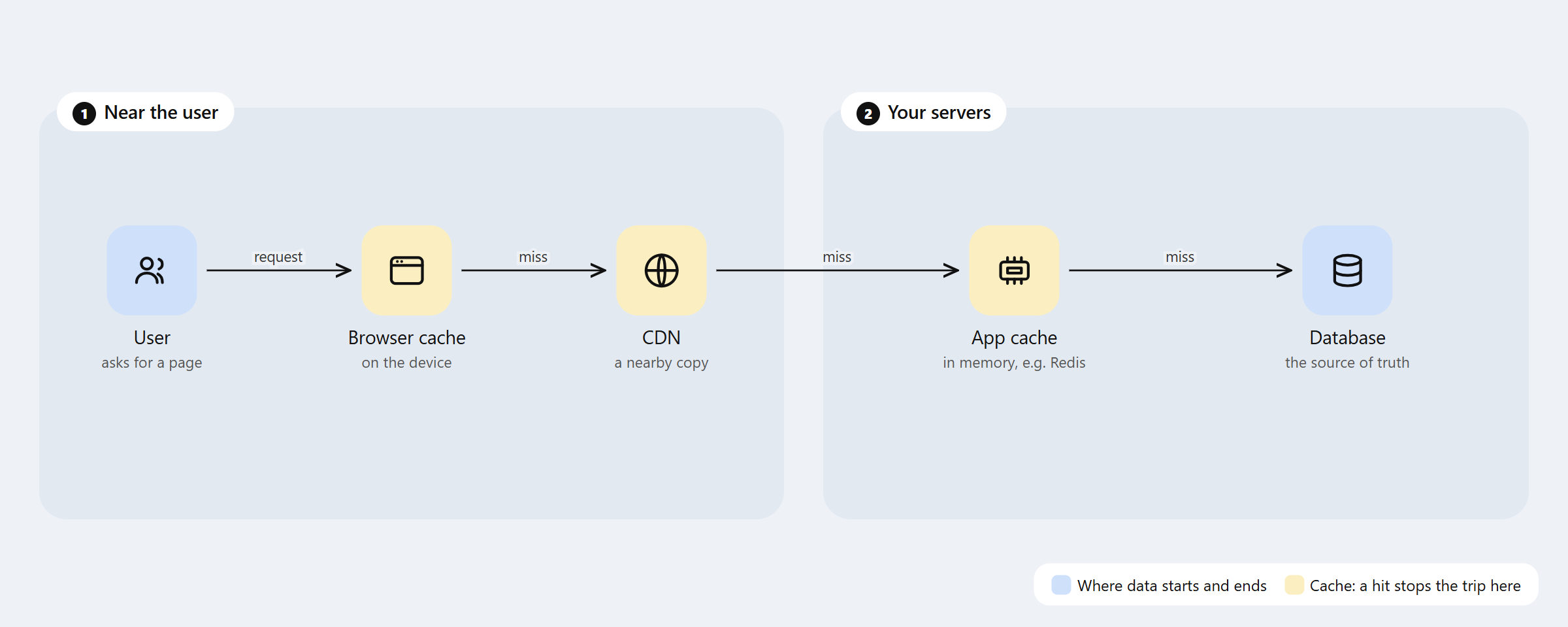
Two words do most of the work here. A hit means the cache had the answer, so the trip stops. A miss means it did not, so the request goes one step further, and the answer usually gets stored on the way back for next time.
The four places a cache can sit
- The browser. Images, styles and scripts stay on the user’s device. The second page load is faster because nothing is downloaded again. The MDN guide to HTTP caching explains the headers that control it.
- A CDN. Copies of your files on servers spread around the world, so a user in Karachi and a user in London both get a nearby copy.
- The app cache. An in-memory store like Redis next to your app. It keeps results that are expensive to compute, such as a user’s profile or a product list.
- The database itself. Databases keep hot data in memory too, so even the last stop has a shortcut.
Time to live
A cached copy can go stale. The simplest fix is a time to live, or TTL: keep this copy for 60 seconds, then throw it away and ask again.
A short TTL means fresher data but more misses. A long TTL means more hits but older data. Picking the TTL is really picking how old an answer your users can live with.
A tiny worked example
Say your product page takes 200 milliseconds to build from the database, and the app cache answers in 2. If 9 out of 10 requests are hits, the average request takes about 22 milliseconds instead of 200. Same servers, same database, nine times faster on average.
What not to cache
Anything where a stale answer causes real harm. A bank balance someone is about to spend from, stock that is about to sell out, a permission that was just revoked. For these, either skip the cache or make sure every change clears the cached copy straight away.
When I added Redis caching for transaction state in a payments system, query latency dropped by about 60%. The work that mattered was not the cache. It was deciding which values were safe to serve a little old, and which had to come from the source every time.
Caching is everywhere once you look
Caches are not only for web pages. When I made a Trino lake as fast as a SQL database, the biggest win was keeping a local copy of table locations instead of asking a faraway catalog on every query. That is a cache with a different name.
The next post covers what to do when caching is not enough and you need more machines: vertical vs horizontal scaling.
Muhammad Mairaj is a Senior Backend Engineer with 8 years building payment and data systems. He writes about data engineering, measured. More about him.