// system design · 21 November 2026 · 2 min read
What a load balancer does, explained simply
One address for your users, many servers behind it, and a quiet check that keeps broken ones out of the way.
 Muhammad MairajSenior Backend Engineer
Your app runs on one server. Then it gets popular, and one server is not enough. You add two more. Now there is a new question: when a user types your address, which of the three servers should answer?
That is the whole job of a load balancer. It sits in front of your servers, takes every request, and hands it to one of them.
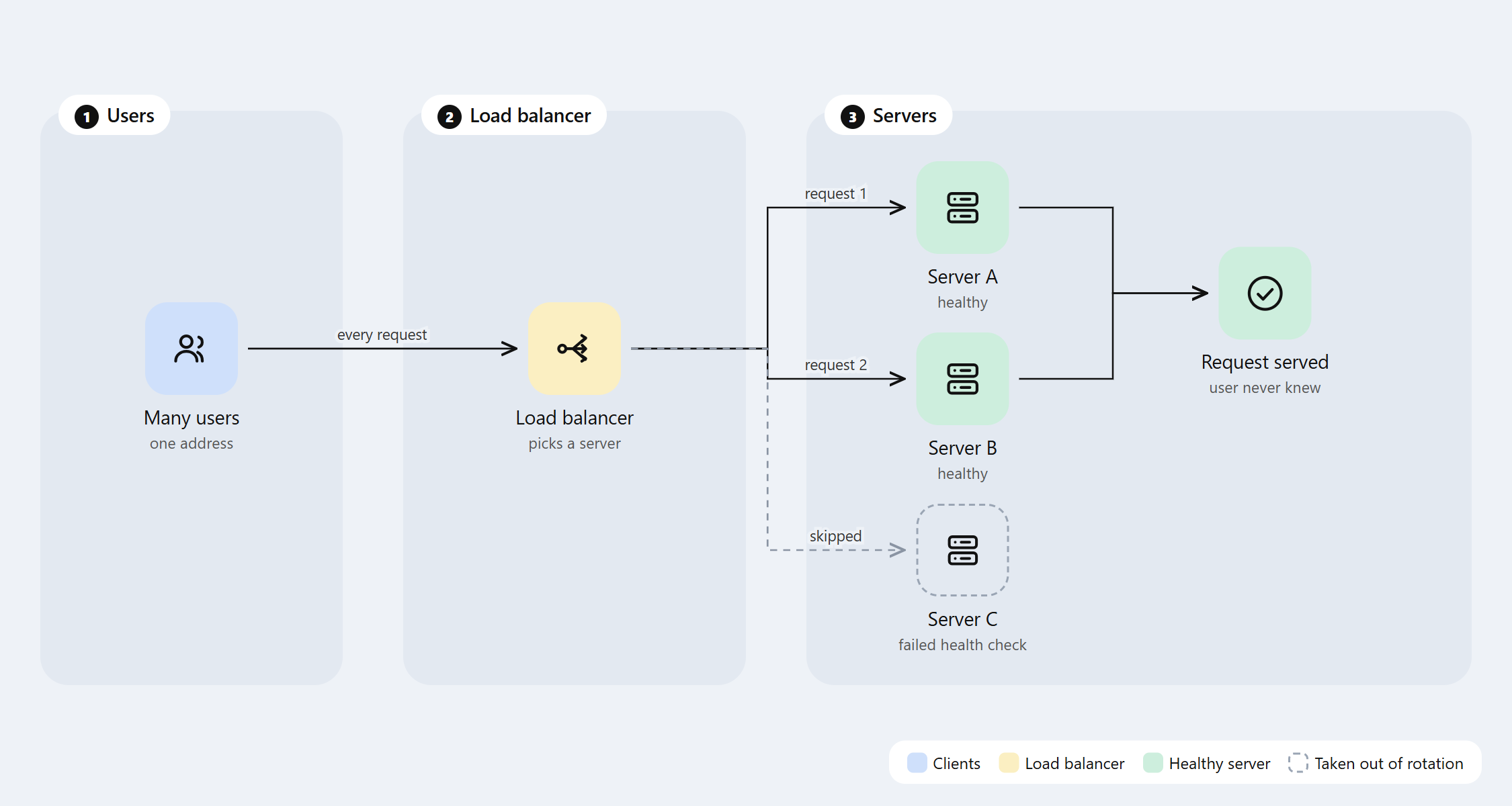
The picture in one sentence
Users talk to one address. Behind that address, the load balancer picks a server for each request, and the user never sees which one did the work.
That gives you two things at once. More servers means more requests per second. And if one server dies, the others keep answering.
How it picks a server
There are a few common ways. The NGINX load balancing guide describes the three you will meet first:
- Round robin. Server A, then B, then C, then A again. Simple and fair when every request costs about the same.
- Least connected. Send the next request to the server with the fewest requests in progress. Better when some requests are slow and some are fast.
- IP hash. The same user always lands on the same server. Useful when a server keeps something about that user in memory.
Health checks: the quiet part that matters most
A load balancer keeps asking each server a simple question: are you OK? If a server stops answering, or answers with errors, it is taken out of the rotation. In the diagram, Server C failed its check, so requests skip it.
This is why a load balancer is about reliability as much as speed. A crashed server stops being a user-facing outage. It becomes a line in a log.
A tiny worked example
Say each server can handle 100 requests per second, and you get 250. One server would fall over. Three servers behind round robin get about 83 each, with room to spare.
Now Server C crashes. The load balancer notices, and A and B take about 125 each. That is over their limit, so they slow down, but nothing goes dark. You add a fourth server, and you are comfortable again. That last step is called scaling out, and it is the next post in this series: vertical vs horizontal scaling.
When you need one, and when you don’t
You need one when you run more than one copy of your app, when you want to update servers one at a time without downtime, or when one machine is no longer enough.
You don’t need one for a side project on a single small server. Add it when you add the second server, not before.
The same idea, inside code
The pattern shows up outside of servers too. When I built single-use payment links, the app talked to several outside providers to read blockchain data, and it failed over to the next one when a provider stopped answering. That is a load balancer and a health check, just written inside the application instead of in front of it.
Once you see the shape, you see it everywhere: one front door, many workers, and someone at the door who knows which workers are awake.
Muhammad Mairaj is a Senior Backend Engineer with 8 years building payment and data systems. He writes about data engineering, measured. More about him.